
I still remember the first time I stepped into the frozen wasteland of Whiteout Survival on my phone. My fingers were numb from the cold—both the game’s atmosphere and my device’s overheating battery. The tiny screen felt like peering through a frosted keyhole into a vast, beautiful, yet brutally demanding world. That all changed in 2026 when I discovered BlueStacks. What began as a struggle for mere existence transformed into a story of thriving dominion, all thanks to playing on PC.
Playing Whiteout Survival on BlueStacks was like trading a cramped ice fishing hut for the bridge of a nuclear-powered icebreaker. The performance leap wasn’t just noticeable; it was transformative. No longer was I squinting at pixelated snowdrifts or waiting for menus to sluggishly load. BlueStacks unlocked the game’s true visual grandeur. The snowstorms, which once chugged, now roared across my monitor with cinematic intensity, each flake a shimmering diamond in the gale. Optimizing it was straightforward. I dove into the settings, ensuring my virtual rig was allocated ample resources: 4 GB of RAM, 4 CPU cores, and the performance mode set to ‘High performance’. Capping the frame rate at a smooth 60 FPS was the final touch. Launching the game and maxing out every graphical setting felt like removing a veil. The settlement I was building ceased to be a collection of icons and became a living, breathing bastion against the cold. 
But beauty was just the beginning. The real magic, the true power of playing on PC, came from control. Managing a survival settlement on a phone is an exercise in frantic tapping—a desperate dance of frostbitten thumbs. With BlueStacks’ Keymapping Tool, I engineered efficiency. Pressing Ctrl + Shift + A opened the Advanced Editor, and I began crafting a control scheme that made the game feel like a native PC strategy title.
-
Selecting multiple survivors became a simple click-and-drag box selection, just like in classic RTS games.
-
Assigning workers to buildings was mapped to a keyboard shortcut, eliminating menu diving.
-
Quick-access keys for the forge, the hospital, and the command center turned complex management into swift, decisive actions.
Setting up these controls felt less like configuring an emulator and more like programming a command console for my own little frozen empire. The settlement management, once a chore, became a satisfying puzzle of logistics and rapid response. My productivity soared. Where I once struggled to keep the furnaces fed, I now had surplus resources, allowing me to focus on exploration and combat. 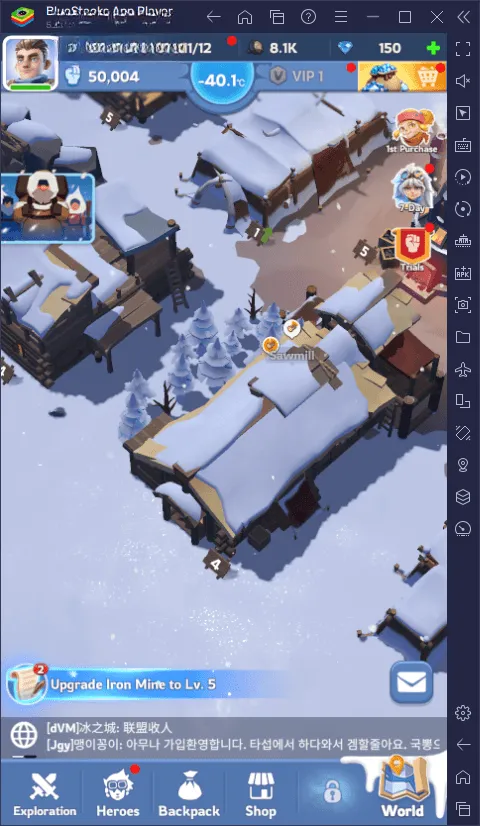
However, any seasoned survivor knows that putting all your supplies in one sled is a recipe for disaster. This is where BlueStacks’ most potent tool entered my arsenal: the Instance Manager. Summoned with Ctrl + Shift + 8, this feature was a game-changer. It allowed me to run multiple instances of BlueStacks simultaneously, which for Whiteout Survival, opened up strategic possibilities I could only dream of on mobile.
| Instance Purpose | Benefit | My Experience |
|---|---|---|
| Main Account | Primary progression and alliance leadership. | My flagship settlement, where I spent most of my time building and strategizing. |
| Alt Account | Resource farming and support for my main alliance. | This account focused purely on gathering, acting like a dedicated supply convoy. |
| Reroll Account | Securing the perfect starting heroes. | I used this to repeatedly restart the game’s initial draws until I landed legendary-tier heroes, a process as tedious as chipping perfect ice sculptures by hand on phone, but effortless here. |
Managing these instances was like conducting a frozen symphony from a single, warm command center. I could monitor all three settlements at once, transfer resources between them, and coordinate attacks or defenses with myself! The reroll process, in particular, was revolutionized. Instead of uninstalling and reinstalling the game on my phone for hours, I could run the opening sequence on one instance while actively playing on another. Getting that perfect starting hero felt less like luck and more like a calculated, multi-front operation. 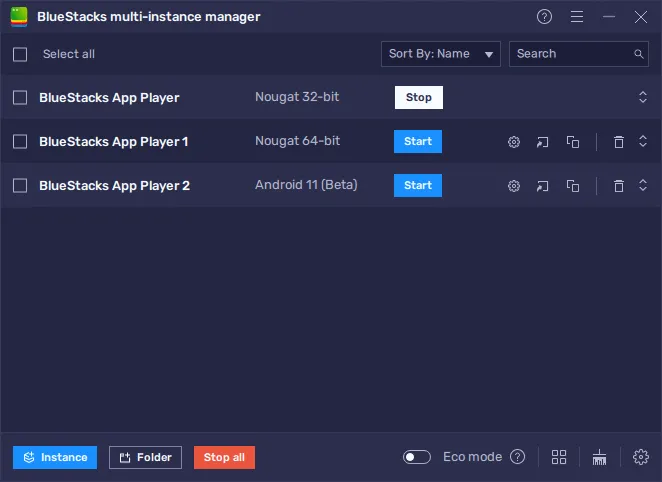
Reflecting on my journey, the difference is stark. Playing Whiteout Survival on my phone was a solitary, tactile battle against the elements and interface limitations. Playing on BlueStacks transformed it into a grand, strategic campaign. The enhanced visuals made the world worth saving, the keymapping gave me the precise tools to save it, and the multi-instance capability let me build an entire coalition to ensure its survival. The grind melted away like spring thaw, leaving only the core, thrilling experience of building, surviving, and conquering in one of the most beautifully harsh settings gaming has to offer. For any aspiring frostlord or survivalist looking to leave more than just footprints in the snow, playing on PC with BlueStacks isn’t just an option—it’s the evolution of the experience. 😊